← Back to home
CANOPUS ASSISTANT

Canopus Assistant

Your personal astrophotography co-pilot, built into Polaris.

An optional AI companion for your imaging sessions. It plans the night, drives your rig through Polaris with your approval, watches focus and guiding, inspects your frames, and answers astrophotography questions, right inside the Polaris web UI. A friendly co-pilot for beginners and a time-saver for everyone.

Free on your own hardware Cloud option: US$4.99/mo, 7-day trial Optional and opt-in

At a glance

Plans your night. Suggests targets for your sky, time, and gear, then builds a ready-to-run multi-target plan in PLAN mode for you to review.

Drives the rig, with approval. Anything that moves hardware or changes a running session is proposed as a plan you approve, review, or reject first, so you stay in control.

Looks at your images. Ask 'is this frame good?' and it inspects the current frame (focus, star shape, trailing, gradients, framing) and tells you what to fix.

Knows astrophotography. Grounded answers on focusing, guiding, exposure, filters, polar alignment, calibration, and diagnosing bad subs.

Cloud or fully offline. Run it in the cloud, on your Polaris host, or on your own device. Two of the three are free and never leave your hardware.

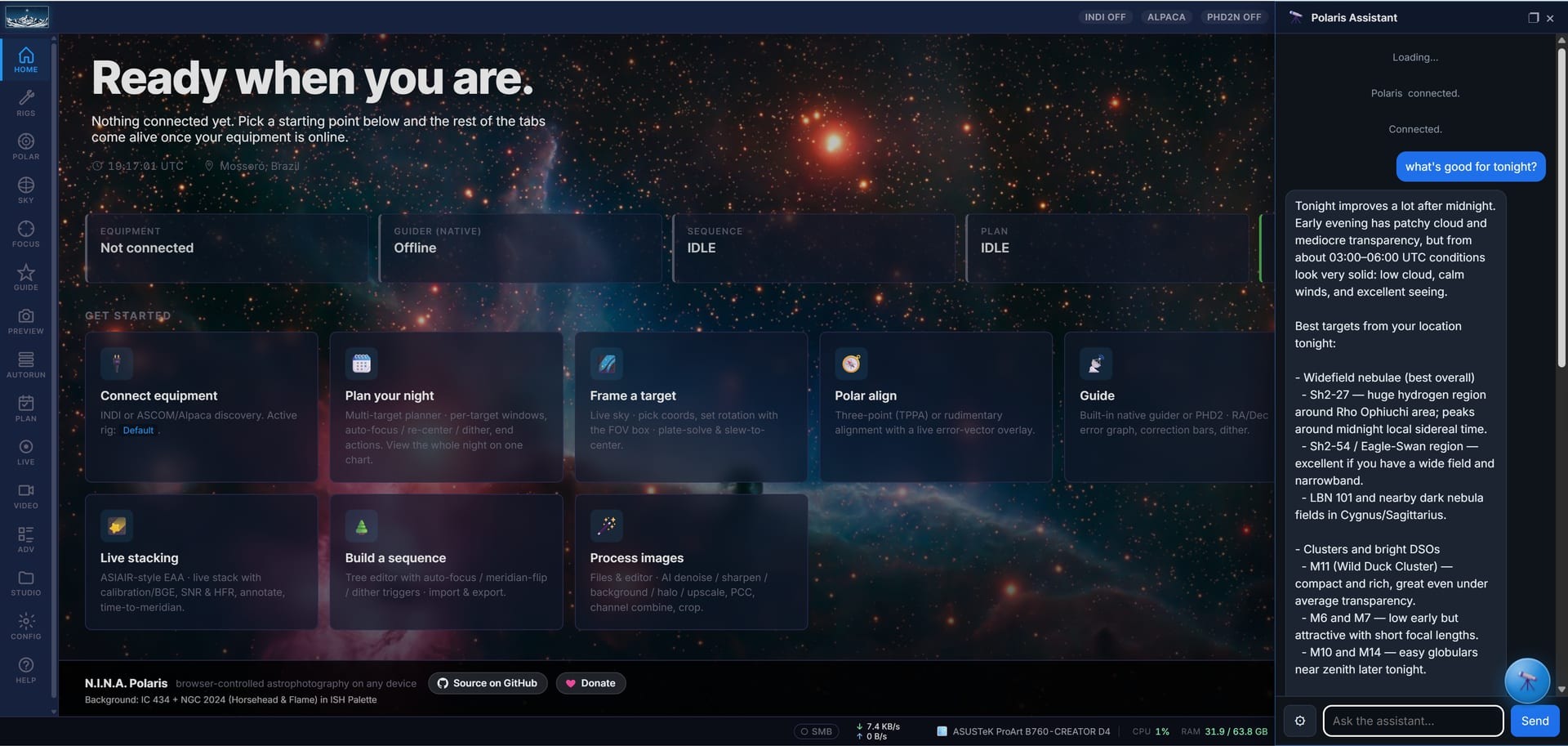
“What's good tonight?” The assistant reads your sky and weather and suggests targets, right beside Polaris.

What it does

🗓️

Night planning

Tell it what you feel like shooting and it does the legwork.

  • Tonight's best. Ranks deep-sky targets, plus the Moon and planets, that are well placed for your location and time window.
  • Checks the essentials. Altitude across the night, weather and seeing, and how the Moon affects each target.
  • Builds the plan. Assembles a multi-target imaging plan in PLAN mode with sensible exposures, dithering, and refocus, for you to review, tweak, and start.
🔭

Hands-on control, safely

It operates Polaris for you, but never behind your back.

  • Approve-first actions. Slewing, autofocus, starting a sequence or live stack, meridian flip: each is proposed as a plan you approve or reject.
  • Shows you what it's doing. Navigates the Polaris UI to the relevant panel so you can watch focus, guiding, or the live stack as it works.
  • Reads the session. Answers 'how's it going?' from live rig status: connection, capture progress, guiding RMS, focus, time to meridian.
📷

Frame analysis

A second pair of (very patient) eyes on every sub. Cloud backend only.

  • Is this good? Inspects the current frame from LIVE, PREVIEW, or AUTORUN and gives a short verdict.
  • Spots problems. Elongated or trailed stars, soft focus, gradients and light pollution, satellites, and framing issues, with a concrete fix.
💬

Astro knowledge

Ask anything, get a grounded answer, not a guess.

  • How-to and why. Focusing and HFR, autoguiding and dithering, exposure and the histogram, filters and light pollution, polar alignment, calibration frames, planning, and diagnosing bad subs.
  • Curated, not hallucinated. Answers are drawn from a curated astrophotography knowledge base and tailored to your question.
🌐

Speaks your language

It follows the language you set in Polaris.

  • Localized replies. Answers, plans, and questions come back in your Polaris UI language.
  • Familiar look. The chat follows your Polaris font, zoom, and spacing, and docks or floats wherever you want it.
🔒

Private by design

Your conversations aren't ours to keep.

  • Chats are not stored. On the cloud backend your messages are processed to generate a reply and then discarded; we don't keep a copy. The local backends never send anything at all.
  • Minimal account data. For the cloud backend, only your email, a login token, and your subscription status are stored. Payment is handled by Stripe; we never see your card. The local backends need no account.
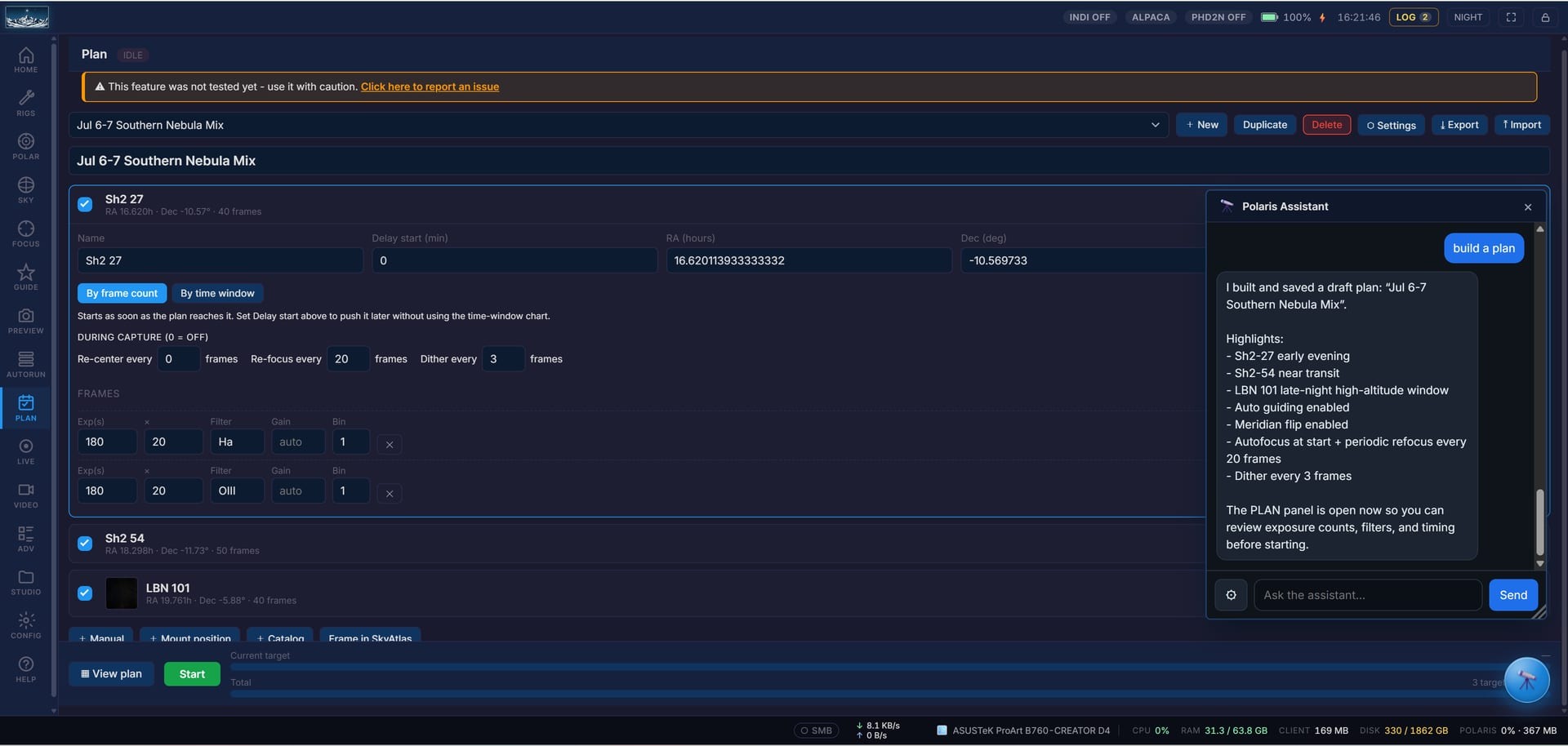
It builds a full night plan in PLAN mode (targets, exposures, autofocus and dither) for you to review before it starts.

How it works

Canopus proposes; you approve; your browser executes the approved action on your local Polaris over the LAN. The brain can live in three places (the cloud, your Polaris host, or the device you are using), but it never talks to your telescope directly.

1

Choose the brain. Run the assistant in the cloud, on your Polaris host, or on your own device. Pick the backend in Settings, Assistant; everything else is identical.

2

Browser bridge. Your browser executes approved actions on your local Polaris API and streams status back. There is no inbound connection to your rig.

3

Opt-in and off by default. The open-source Polaris ships a neutral, inactive host. The assistant appears only if you choose to enable it.

Three ways to run it

One assistant, your choice of brain. All three drive the rig the same way and share the same approve-first safety. Pick one in Settings, Assistant.

☁️

Cloud

The most capable brain, always on, nothing to install.

The assistant's AI runs on our servers and returns a reply; your browser relays approved actions to your local Polaris.

  • Cost. Paid subscription: US$4.99 per month, with a 7-day free trial.
  • Runs on. Our servers (Microsoft Azure). No local model, no GPU needed.
  • Minimum. An internet connection and a subscription. Any device that runs the Polaris web UI.
  • Recommended. The same. This is the strongest option and the only one that does frame analysis (looking at your images).
  • Privacy. Messages are processed to reply, then discarded, and are not used to train models. Only your email, a login token and subscription status are stored.
🖥️

On this host

Free and fully offline, running on your Polaris host.

A small language model runs on the Polaris host itself, so any phone or tablet on your network becomes a thin client. No account, no subscription.

  • Cost. Free.
  • Runs on. The Polaris host, on the CPU. An NPU or GPU is a bonus, not a requirement.
  • Minimum. A 64-bit host with about 6 GB of RAM free alongside Polaris.
  • Recommended. 8 GB or more and a faster processor. Warm replies land in a few seconds; the first reply of a session takes longer while the model warms up.
  • Text-only. Plans the night, drives the rig, and answers questions. Frame analysis (vision) is cloud-only.
  • Privacy. Everything stays on your hardware. Nothing is sent to us or to any AI provider.
📱

On this device

Free and offline, running on the computer or phone you are using.

The model runs on your own machine. On a desktop it uses a local LLM server you run on the native GPU; in the mobile app it runs the model on the phone.

  • Cost. Free.
  • Runs on. Your computer's GPU (through Ollama, LM Studio, or llama.cpp), or your phone in the Polaris mobile app.
  • Minimum. Desktop: a local LLM server and a tool-capable model that fits your GPU memory. Mobile: an 8 GB device, since the model loads fully into RAM.
  • Recommended. Desktop: a 12 to 24 billion parameter tool-capable model on a 16 GB or larger GPU. Mobile: an 8 GB phone or tablet, for smooth replies in a few seconds.
  • Text-only. Same as the on-host backend: planning, rig control, and Q&A; frame analysis is cloud-only.
  • Privacy. Runs locally; nothing leaves your machine. If you point the desktop option at a remote endpoint, that service sees your messages under its own terms.
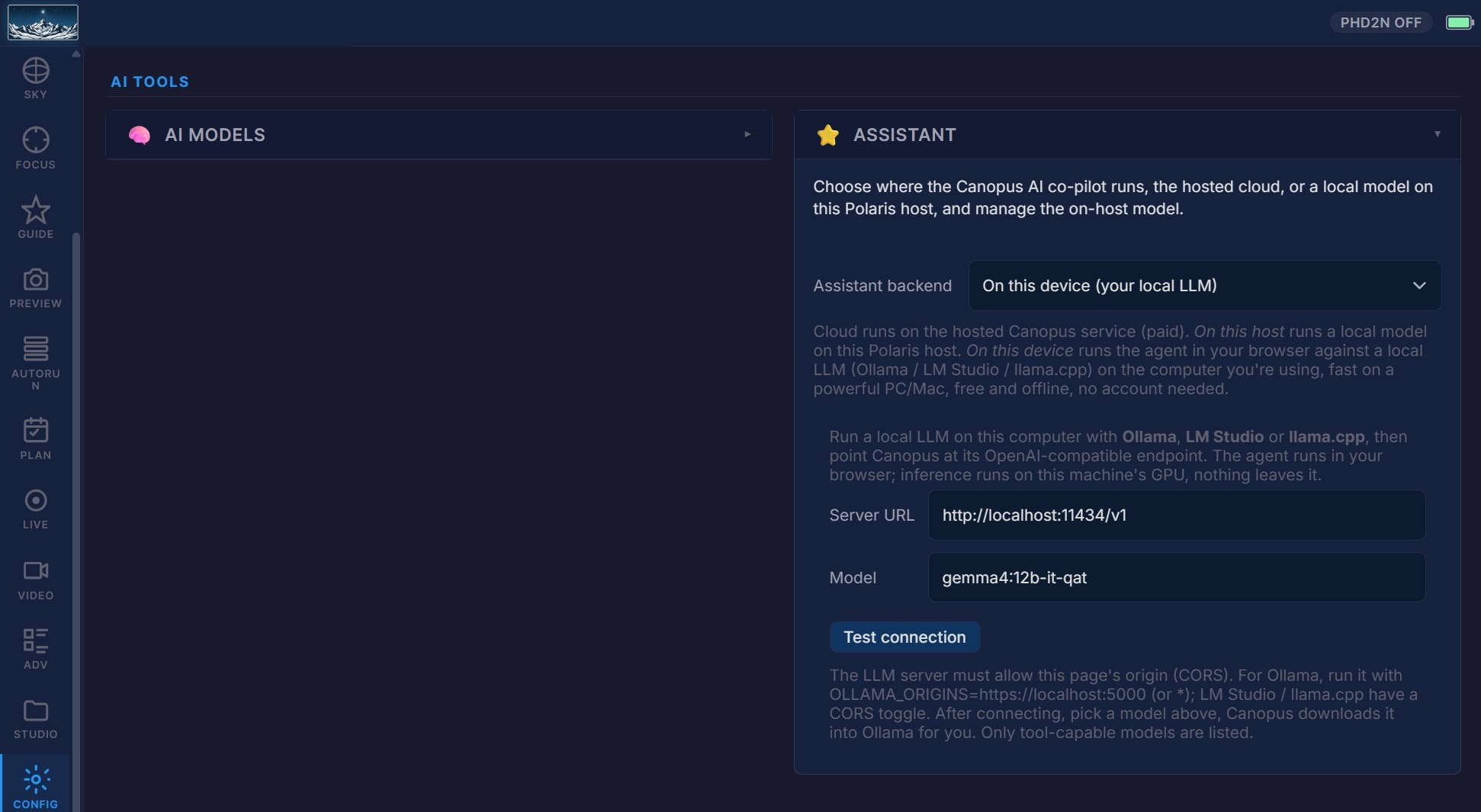
Choosing the backend in Settings, Assistant: cloud, on this host, or on this device, each with its own controls.

What each backend can do

Every backend asks before it changes anything and shares the same core planning, navigation and rig-control tools. The cloud tier adds image analysis, the multi-target planner and post-processing. The exact tool names are listed under each capability.

Capability CloudOn this hostOn this device
Planning and advice
Tonight's best targets, catalog search, altitude tracks and the astronomy weather forecast get_tonights_best, search_catalog, get_altitude, get_weather
Answer astrophotography and Polaris questions from the built-in manual search_knowledge
Live session and rig control
Read the live rig status and switch the Polaris UI to the right panel get_status, show_panel
Slew the mount and plate-solve-center on a target slew_to
Run an automated V-curve autofocus run_autofocus
Start live (EAA) stacking and dither on demand start_live_stack, dither_now
Stop the running capture sequence stop_sequence
Park or unpark the mount, stop guiding, stop live stacking park_mount, unpark_mount, stop_guiding, stop_live_stack
Multi-target planner
Create, list, start and stop a full multi-target night plan create_plan, list_plans, start_plan, stop_plan
Image analysis (vision)
Inspect a captured frame, the selected library frame, or the current on-screen view analyze_frame, analyze_selected_frame, analyze_current_view
Post-processing (STUDIO)
Read library stats, refresh and list frames, grade, integrate and preview results get_studio_stats, refresh_library, list_frames, grade_frames, integrate_frames, preview_frame
Nature of the backend
Proactive monitoring and nudges during a session
Works with no internet connection
Cost Subscription (US$4.99/mo) Free Free
Runs on Our cloud (Azure) The Polaris host The device you browse from

Mutating actions (anything that moves the mount, changes capture, or stops a running task) always show an approval card first, on every backend.

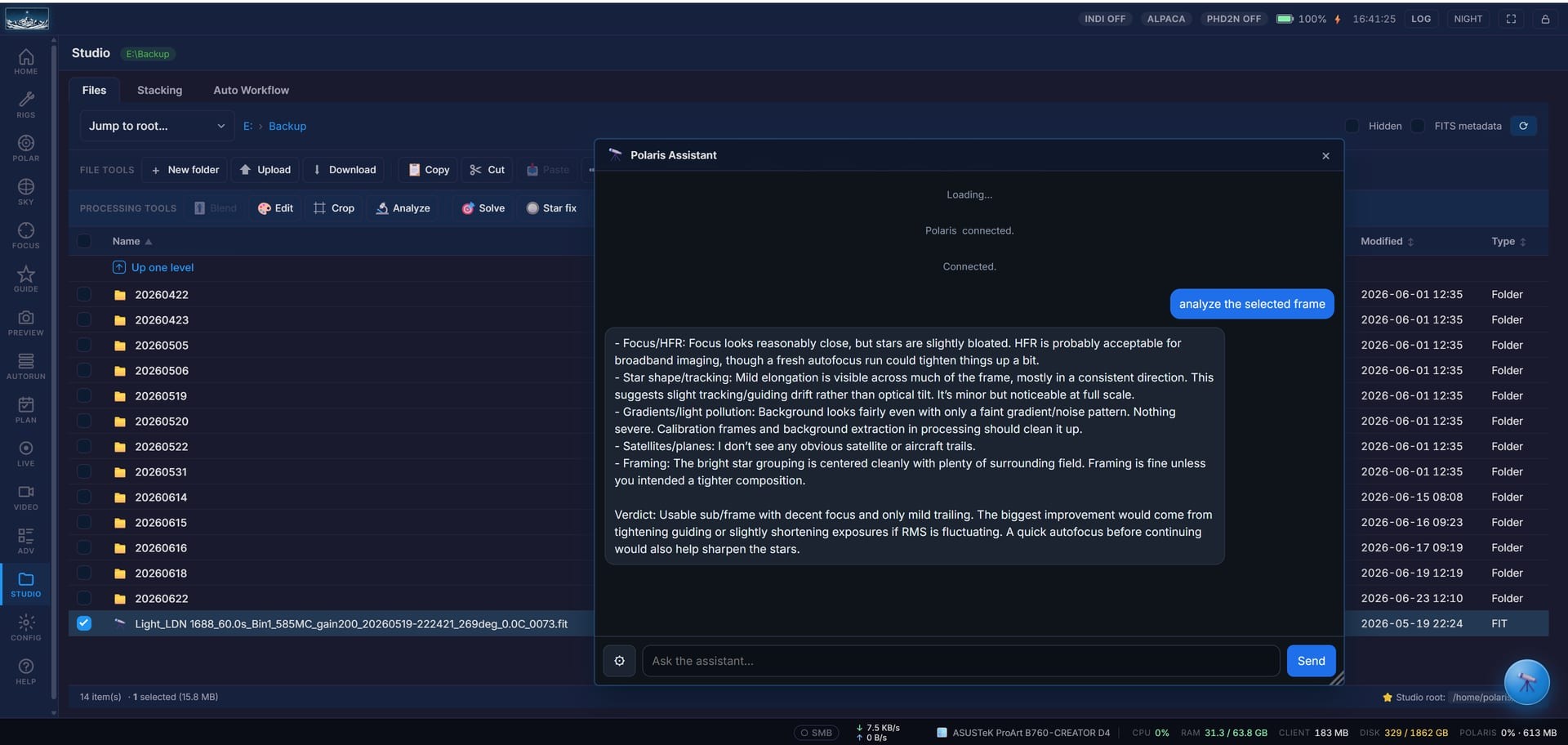
Frame analysis: it inspects the sub you selected and gives a verdict on focus, star shape, tracking and framing.
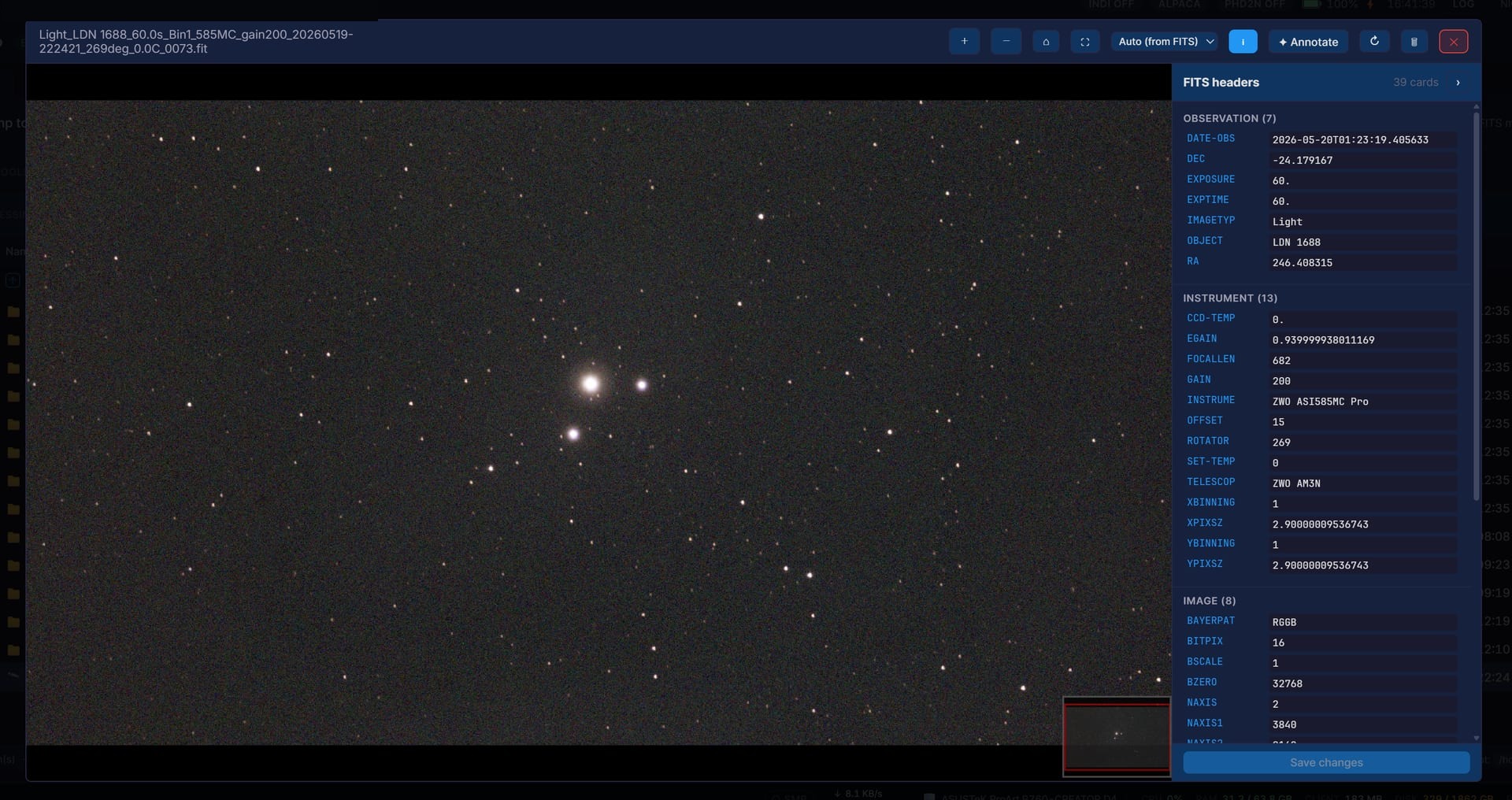
The exact frame it looked at, opened straight from your Studio Files, no manual export needed.

Cloud backend pricing

Only the cloud backend costs anything. Running the assistant on your Polaris host or on your own device is free, with no account.

US$4.99 per month

✨ 7-day free trial

Pricing is for the cloud backend. The on-host and on-device backends are free. Single flat plan; cancel anytime and access continues to the end of the paid period.

The assistant is optional and opt-in, with free offline backends; Polaris itself stays free and open-source.

Get Polaris