22 Color Calibration
A freshly combined (or freshly debayered) master almost never has believable color: filters, sensor response, and sky glow each pull the balance their own way, leaving a color cast over the whole frame. STUDIO’s Color calibration tool answers with three calibrators that map directly onto the three tools Siril (The Siril Team, n.d.) users reach for between stacking and editing, plus a fourth, spectrophotometric method covered later in this chapter:
| Mode | What it does | When to use it |
|---|---|---|
| BG neutralize | Subtracts per-channel offsets so the sky background becomes neutral gray. | Quick first pass on any color-cast master. No setup. |
| Manual | BG neutralize plus a white-reference patch you pick. | When the background step alone leaves a tint and a known-white target (a Sun-like star, a galaxy core) is in frame. |
| PCC | Photometric Color Calibration against the bundled APASS star catalog (Henden and Munari 2014). | The gold standard: your stars’ colors are fitted to their published catalog colors. Needs a plate-solved image and the catalog installed. |
All three are non-destructive: each writes a sibling FITS next to the source ({stem}_bgneu.fits, {stem}_ccal.fits, or {stem}_pcc.fits) and indexes it in the frame library. The original stays untouched, so you can experiment freely.
22.1 Where it fits in the pipeline
Slot color calibration between channel combination and the AI cleanup in the mono workflow:
per-filter masters → Combine → Color calibration → BGE → Denoise → Decon → EDITOR → Export
                              ^^^^^^^^^^^^^^^^^^
                              this chapter
For OSC (one-shot color) shooters, run it between debayering and the AI cleanup, or skip it entirely if your pipeline already produces a neutral result.
22.2 Running a calibration
- Select one RGB FITS master in STUDIO, typically the Combine output (
rgb_*.fitsorlrgb_*.fits, Chapter 21). - Click Color calibration in the selection bar. The modal opens.
- Pick a tab (it defaults to BG neutralize):
- BG neutralize: leave the sampling on Auto unless you have a specific dark patch in mind, then click Calibrate.
- Manual: keep BG on Auto, type the pixel coordinates of a white-reference patch (a small rectangle around a known Sun-like star, say), then click Calibrate.
- PCC: check the catalog badge at the top of the tab. If it shows the APASS catalog as installed, click Calibrate; otherwise see the setup section below.
- Wait. BG and Manual take a few seconds; PCC takes 10 to 30 seconds depending on the image size and how many stars match.
- The completion toast shows the output path, the per-channel gains, and, for PCC, the matched-star count. Open the sibling FITS in the viewer to compare against the source.
22.3 BG neutralize
The simplest case: per-channel offsets are subtracted so the chosen background region becomes neutral gray at the level of the dimmest channel. Overall image brightness is preserved. Two sampling modes:
- Auto (recommended): samples the lowest-luminance 5% of pixels across the whole frame, which finds the darkest background automatically and works on any frame with some empty sky.
- Patch: type
x, y, w, hin pixel coordinates for a rectangle over a dark, empty-sky region. Use it when the auto-sample picks up something it should not: very dim nebulosity, a vignetted corner, amplifier glow.
Output: {stem}_bgneu.fits, with the mode and the three per-channel offsets recorded in the FITS header.
22.4 Manual
Background neutralization plus a white-reference rescale. After the background step, per-channel gains are computed to bring your chosen patch to neutral. In this mode the background step subtracts each channel’s full median (a “zero background”) so the subsequent gain does not pull the background away from neutrality again.
Good white references:
- A G2V star, meaning one of the same spectral class as the Sun, with a color index B-V of about 0.65 (B-V compares a star’s brightness through blue and green-yellow filters; smaller is bluer). By definition, sunlight is what we perceive as white, and G2V stars are visible all over the sky.
- The core of a spiral galaxy (M31, M81): usually neutral, except for heavily dust-reddened cores.
- A neutral region of a nebula, where ionization is balanced.
Output: {stem}_ccal.fits, with offsets and gains in the header.
22.5 PCC: photometric color calibration
The science-grade tool, modeled after Siril’s PCC (The Siril Team, n.d.). Instead of trusting any patch of your image, it measures the brightness of identified stars in each channel (photometry) and fits the channel gains so those stars match the colors a published survey measured for them. The pipeline:
- Read the sky coordinates from the source’s WCS headers (WCS, World Coordinate System, is the FITS convention that maps pixel positions to sky positions; it is written by plate solving, see the setup below).
- Detect stars on the green plane, which has the highest signal-to-noise.
- Measure each star’s per-channel flux with aperture photometry: summing the pixels in a small circle of twice the star’s HFR, minus the local background measured in a surrounding ring.
- Query the APASS catalog for the stars in the field of view.
- Match catalog positions to detected stars within 3 pixels, dropping saturated stars and catalog entries without B-V data.
- For each matched star, compute the expected R/G and B/G ratios from its B-V index (a log-linear relation anchored at G2V); divide observed by expected, and take the median across all matched stars as the per-channel gains.
- Apply zero-background neutralization, so the output is both star-color-calibrated and background-neutral.
Output: {stem}_pcc.fits, with the gains in the header and the matched-star count reported in the toast. PCC requires at least 5 matched stars and fails with an actionable error message if it finds fewer.
22.6 Setting up PCC
PCC needs two ingredients the other modes do not.
A plate-solved source
The source FITS must carry WCS headers (CRVAL, CRPIX, and the CD matrix). ASTAP (Kleijn, n.d.), the plate solver bundled with Polaris, writes them automatically when you run Solve in STUDIO, and they survive integration and channel combination because Polaris carries the WCS through on the reference frame. If PCC fails with “source FITS has no WCS”, run Solve on the master first and retry.
The APASS catalog
The catalog is AAVSO’s Photometric All-Sky Survey, APASS DR9 (Henden and Munari 2014), stored at wwwroot/catalogs/apass/apass.db under the Polaris install: about 600 MB at the default magnitude cap (V ≤ 13), roughly 5.3 million stars. The file does not ship inside Polaris releases, because of its size and the catalog’s attribution requirement, so you populate it once on the host:
python scripts/download-apass.pyThe script pulls APASS DR9 from the VizieR astronomical data service (catalog II/336/apass9) in declination stripes, filters to stars brighter than V magnitude 13, and builds the SQLite database with a spatial index for fast sky queries.1 Expect about 5 minutes on a desktop with a reasonable home connection, about 15 on a Raspberry Pi 5. The downloaded stripes are cached in scripts/.apass-cache/, so a re-run with --skip-download rebuilds the database without touching the network again.
Two overrides matter at the extremes: --mag-limit 15 deepens the catalog for very long focal lengths (the file grows to roughly 3 GB), and --stripe-deg 2.5 halves the per-query stripe if a future catalog update ever hits the service’s per-query row cap.
Why DR9 rather than the newer DR10: AAVSO has not published DR10 as a programmatic download, and DR9, with 62 million stars, is what Siril and the rest of the astrophotography toolchain ship against today; it is more than enough for PCC.
The PCC tab’s catalog badge tells you whether the file is in place; if it reads “not installed”, run the script and reopen the modal.
Alternative catalogs
The catalog reader uses a generic layout (a stars table with ra, dec, mag_v, mag_b, b_v, and source columns plus the spatial index), so a Gaia DR3 (Gaia Collaboration et al. 2023) or Tycho-2 subset in the same layout, dropped in at the bundled path as apass.db, works transparently.
22.7 SPCC: spectrophotometric color calibration
PCC maps each star’s broadband color (B-V) to expected channel ratios through one fixed empirical slope. SPCC goes a step further: it integrates an actual stellar spectrum through the actual total response of each of your channels, the filter’s transmission curve multiplied by the sensor’s quantum efficiency (QE, the fraction of arriving photons the sensor converts to signal at each wavelength), the way PixInsight’s SPCC (Pleiades Astrophoto, n.d.) and Siril 1.2+ do. The white balance becomes physically grounded in your specific gear rather than a generic star-color rule.
Open it from the Stack workspace: add the plate-solved, integrated RGB master to the Lights slot, then press SPCC (next to Color Cal (PCC)).
When the modal opens it reads the master’s FITS header (the camera model in INSTRUME and the Bayer pattern in BAYERPAT) and pre-selects the sensor and the OSC/mono type for you. A frame from a “ZWO ASI2600MC Pro” auto-picks the Sony IMX571 (OSC) curve; a mono ASI183MM picks IMX183 (mono). A short note says what it matched, and you can always override it. If the camera is not in the curve database it falls back to the generic sensor of the right type.
In the SPCC modal you pick:
- Sensor: an OSC camera (its color-filter-array response is built in) or a mono sensor (one QE curve, combined with an RGB filter set).
- Filter set: for OSC, an optional broadband or UV/IR-cut filter, or none; for mono, the R/G/B filter set.
- White reference: the spectrum that should come out neutral: a G2V star (Sun-like), an average spiral galaxy, daylight D65 (the standard daylight illuminant), or an equal-energy flat spectrum.
- Spectra: where each star’s spectrum comes from:
- Blackbody (from B-V): always available, fully offline, and a good broadband approximation. Each star is modeled as an ideal glowing body at the temperature its B-V color implies.
- Pickles: empirical stellar spectra with real absorption lines, from the 131-template Pickles UVKLIB library (Pickles 1998). Ships bundled (
wwwroot/catalogs/spcc/pickles.json), so it works out of the box; rebuild the file withpython scripts/download-pickles.pyif ever needed. - Gaia DR3: per-star measured spectra from the Gaia space observatory (Gaia Collaboration et al. 2023). Planned; it is a heavy download, scaffolded via
scripts/download-gaia-spcc.py. - Auto picks the best installed source, preferring Gaia, then Pickles, then Blackbody.
SPCC needs the same pre-flight as PCC: a plate-solved master and the APASS catalog, which supplies the star positions and B-V colors.
The White Balance summary
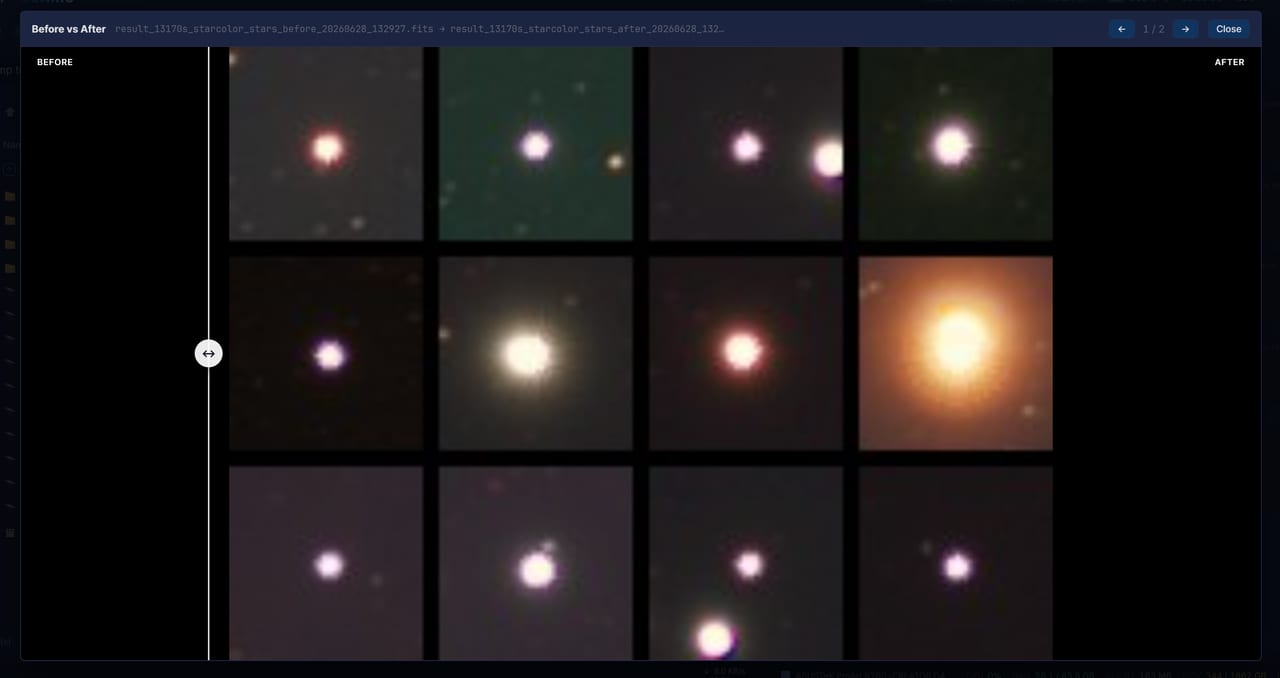
When PCC or SPCC finishes, the input modal closes and a White Balance summary appears: two scatter plots (B/G and R/G) of each matched star’s measured channel ratio against its expected ratio, with a robust line fit, the same read-out Siril and PixInsight show. A tight cluster along the green fit line means a confident calibration; the header reports the fit slope, the scatter (sigma), the star count, the outliers removed, and the applied R/G/B gains. A Before / after button opens the comparator; for color calibration the comparator stretches each side independently, so the color change is actually visible rather than being masked by a shared stretch.
Filter and sensor curves
Polaris ships two curve databases, both merged into the same dropdowns.
The first, wwwroot/catalogs/spcc/curves.json, holds generic, idealized curves so SPCC works on any offline install out of the box. They are labeled “Generic” and are not measured manufacturer data. The set covers a spread of archetypes: OSC (neutral, modern back-illuminated with strong red and near-infrared response, and older front-illuminated CCD), mono (standard and modern high-QE), and filter sets (no filter, UV/IR-cut, broadband light-pollution, dual-band Ha+OIII, and RGB for mono).
The second, wwwroot/catalogs/spcc/curves-siril.json, is the community-curated Siril SPCC database (The Siril Team, n.d.) imported into the same schema. It carries real measured QE and transmission curves for dozens of actual cameras (Sony, Canon, Nikon, Kodak sensors) and filters (Antlia, Astronomik, Baader, Optolong, ZWO, and more), labeled “(Siril)”. It is distributed under the GPL v3 with attribution (see wwwroot/catalogs/spcc/LICENSE.txt); regenerate it with python scripts/download-siril-spcc.py --src <clone of the Siril SPCC repo>. If your exact camera and filter are in the list, pick those for a much closer match than the generic archetypes.
For gear in neither list, edit curves.json and drop in your own filter transmission and sensor QE curves. Each curve is:
{ "wl": [400, 450, ...], "v": [0.32, 0.61, ...] }with wavelengths in nanometers, strictly increasing, and values from 0 to 1; a channel’s total response is sensor times filter.
You can check what is installed under SETTINGS → Colour calibration data: the APASS catalog status, which SPCC spectral sources are present (Blackbody always, Pickles bundled, Gaia planned), the count of sensor and filter curves (generic and Siril combined), and the path to curves.json for editing.
The method, for the curious
For each channel c, the expected signal from a star is the photon-weighted band integral of its spectrum through that channel’s response:
Exp_c = ∫ F(λ) · T_filter(λ) · QE(λ) · λ dλSPCC recovers each channel’s unknown system throughput as the median of observed over expected across the matched stars, then sets the gains so the chosen white reference comes out neutral, anchored at green. Blackbody spectra use Planck’s law, with the effective temperature derived from B-V via the Ballesteros relation (Ballesteros 2012).
22.8 The recipe in the headers
Every output FITS records what was done to it, so any FITS header inspector (PixInsight’s FITS Header view, for example) can answer “why does this look like this” months later:
CCAL_MOD = 'bg' / 'manual' / 'pcc'
CCAL_OFR = 32.5     (per-channel offset applied to R)
CCAL_OFG = 0.0
CCAL_OFB = 18.1
CCAL_GNR = 1.124    (per-channel gain applied to R)
CCAL_GNG = 1.000    (anchor channel, always 1)
CCAL_GNB = 0.953
CCAL_SRC = 'lrgb_M81_2026.fits'   (source file name)
PCC outputs additionally record the matched-star count (CCAL_NSTAR).
22.9 Worked example: M81 LRGB with PCC
Raspberry Pi 5 host, ZWO ASI2600MM Pro, Askar FRA600, LRGB filters, APASS catalog already populated:
| Step | Time | Output |
|---|---|---|
| Capture: 30L + 15R + 15G + 15B at 180 s each, unattended | 5 h | 75 raw lights |
| STUDIO: calibrate and integrate per filter | 10 min | 4 per-filter masters |
| STUDIO: Combine (LRGB, Lab swap) | 25 s | lrgb_M81_*.fits |
| STUDIO: Solve (if not already solved) | 5 s | WCS in the headers |
| STUDIO: Color calibration → PCC | 20 s | lrgb_M81_*_pcc.fits |
| GraXpert background extraction | 30 s | _bge.fits |
| GraXpert denoise | 90 s | _denoise.fits |
| EDITOR tone work | 8 min | sidecar saved |
| Export JPG at quality 92 | 3 s | final image |
The PCC step is fast (the heavy part, the catalog cone search and star matching, runs in milliseconds on the indexed database) and ends the “is this green cast real or just my filter mix” debate: the gains are fitted from real photometry.
22.10 Common pitfalls
- PCC reports “only 3 matched stars”: the field genuinely has few catalog stars (planetary close-ups, dark molecular clouds), or the plate solve is too inaccurate for the 3-pixel match radius. Re-solve with a better hint, or fall back to Manual mode.
- PCC output still looks slightly tinted: the linear B-V fit is approximate, to roughly 5%. For tighter fidelity use SPCC, which integrates real spectra through your gear’s response, or Manual mode with a measured G2V star.
- BG output still has a cast: the auto-sample caught faint nebulosity. Switch to Patch mode and pick a darker corner.
- Manual output has a neutral background but a tinted white patch: the patch landed on something that is not neutral (a colored star, a nebula edge). Pick a different patch and re-run.
- The catalog badge says “not installed” after deployment: the database is not part of the release package. Run
python scripts/download-apass.pyon the host; no redeploy is needed afterwards.
22.11 Attribution
APASS data is provided by the AAVSO under a CC-BY 4.0 license. If you publish images calibrated with PCC or SPCC, please credit the survey (Henden and Munari 2014):
Henden, A. A., Levine, S., Terrell, D., Welch, D. L., Munari, U., & Kloppenborg, B. K. (2016). “AAVSO Photometric All Sky Survey (APASS) DR9.” VizieR On-line Data Catalog: II/336.
An R*tree index, which lets the “which stars fall inside this field of view” query run in milliseconds.↩︎